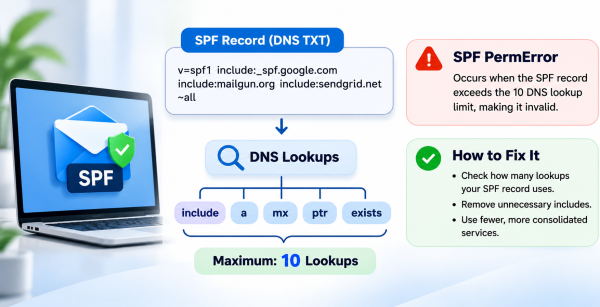
You open a DMARC report or a bounce log and see spf=permerror. If the receiving server is a little more helpful, it says “too many DNS lookups” instead. The first time this happens it makes no sense. Your SPF record is right there in the DNS dashboard, and mail was going out fine last month.
The record isn’t missing. The receiver started reading it and gave up partway through.
What SPF permerror actually means
When a server receives a message, it takes the domain from the envelope sender. That’s the MAIL FROM or Return-Path address, not the From line people see. The server fetches that domain’s SPF record and works through it from left to right until something matches the IP that sent the message.
Some of those mechanisms need extra DNS queries before they can be checked. RFC 7208 caps the number of those queries at 10. If a receiver hits the cap, it stops and returns a permanent error.
Three different results get mixed up a lot:
- No record at all. The result is none.
- Softfail from ~all. The record was read fine, and the sending IP just isn’t on it.
- Permerror. The record couldn’t be evaluated.
A permerror is worse than it looks. For DMARC, a permerror means SPF didn’t pass, so the message is depending entirely on DKIM. If the DKIM signature also breaks, for example after a forward or because of a wrong selector, the message fails DMARC.
What counts toward the 10
These mechanisms and modifiers each cost a lookup:
- include
- a
- mx
- ptr
- exists
- redirect=
These are free: ip4, ip6 and all.
The part that catches most people is that an include counts once for itself and then again for every lookup inside the record it points to. Your TXT record might show five includes while the receiver ends up walking through fifteen lookups.
There’s a second limit people rarely hear about. The RFC also allows only two “void” lookups, meaning queries that come back with no answer or a non-existent domain. An old include pointing at a provider that has since deleted its SPF record can hit that limit without ever getting close to ten.
It’s about the path, not the whole tree
Evaluation stops at the first match. Say a message comes from a Google Workspace IP and Google’s include is first in your record. The receiver never looks at anything after it.
That’s why permerror often shows up for only one type of mail. The usual complaint is “our app emails are fine, but the newsletter keeps failing.” The lookups pile up before the receiver reaches the newsletter provider’s include, so the order of includes matters.
How a record gets this big
Nobody builds a record like this on purpose:
v=spf1 include:_spf.google.com include:sendgrid.net include:servers.mcsv.net include:mail.zendesk.com include:spf.protection.outlook.com ~all
It grows one service at a time. Google Workspace on day one. A transactional provider when the app launched. A newsletter tool the marketing person signed up for. A helpdesk. Then an Outlook include from a migration that was never completed.
Each provider maintains its own SPF record, and several of them nest further includes. They can also change those records whenever they want. Your TXT record can stay exactly the same for a year while your lookup count goes up.
Counting your own lookups
You can do this by hand. Start with:
dig +short TXT example.com
Then run dig on each include, and on each include inside those, keeping a count as you go. It works, but it gets tedious after the second level.
A quicker way is to paste the domain into SendPanda’s SPF checker, which follows the include and redirect chain and lists every term that triggers a lookup. Read the number it gives you carefully. The tool has no sender IP, so it explores every branch it can see, while a real message only takes one path. The total it shows is an inventory, and it can be higher than what any single message actually costs. It also doesn’t fully evaluate a, mx, ptr, exists or macros.
So don’t use it as a pass/fail test of the 10-lookup rule. Use it to find dead includes, duplicate records, and the providers that are adding the most weight.
Two SPF records is a different problem
This one usually shows up after a provider switch. Someone follows the new provider’s setup guide and adds a second TXT record starting with v=spf1 instead of editing the existing one.
The RFC is clear here: more than one SPF record on the same name is a permerror, however few lookups each one has. The cause is different and so is the fix, which is to merge them into one.
Don’t confuse that with a long record split into quoted strings. This is still one record, and receivers join the pieces back together:
“v=spf1 include:_spf.google.com ” “include:sendgrid.net ~all”
How to fix it
1. Find out who actually sends as your domain. Ask marketing, support and whoever runs billing. Any include for a service nobody uses anymore can go.
2. Check whether each include belongs on the root domain at all. SPF is checked against the envelope sender, not the visible From address. Many providers set the Return-Path to their own bounce domain, or to a subdomain of yours such as bounces.example.com. If that’s the case, their include on your root domain does nothing for their mail. Their setup docs will tell you which domain they use.
3. Move senders onto subdomains. Each hostname has its own SPF record and its own budget of 10. You could send the newsletter from news.example.com, for example. DMARC alignment is relaxed by default, so a subdomain of the same organizational domain still aligns.
4. Keep a single record per name. Combine everything that’s left into one v=spf1 TXT record.
5. Recheck after every change, and every few months. Providers update their records on their own schedule, and your count can change without you doing anything.
What about flattening?
Flattening means replacing includes with the ip4 and ip6 ranges they currently resolve to. It brings the lookup count close to zero, and it works.
The downside is that you now own that IP list. When a provider adds a new range, mail from the new IPs starts failing, and nothing alerts you. Paid services exist that re-flatten automatically, but it’s better to treat flattening as the last option, after you’ve removed what you don’t need.
A short checklist
- Look for permerror in DMARC reports, not only in bounces.
- Count lookups per path, keeping in mind that nested includes add up.
- Remove includes for services you’ve stopped using.
- Confirm which domain each provider uses as its Return-Path.
- Move heavy senders to subdomains.
- Keep one v=spf1 record per name.
- Recheck on a schedule.
In most cases, permerror means the record has outgrown the services that actually send for you. Removing the old includes usually fixes it, and once the cleanup is done the problem rarely comes back.