I don’t have a design background. I’ve never sat with a factory rep going line by line through a spec sheet, and a month ago I wouldn’t have known what point of measurement meant on a manufacturing document. So when Genpire came up, an AI tech pack generator built to take a product idea and turn it into something a factory can actually work from, I didn’t want to read about it. I wanted to sit down, describe a product, and see what came out on the other end.
Most of the reviews I’d come across for tools like this fell into two camps. Either they were written by someone who clearly never opened the product and just rewrote the landing page, or they were written by a designer who already knew how to build a tech pack by hand and was judging the AI against their own years of training. Neither of those told me what I actually wanted to know, which is, if you’re a regular person with a product idea and none of that background, does this get you somewhere real?
So I kept the test product simple on purpose. A reusable travel coffee tumbler for a placeholder brand I called Roast & Rise. Nothing dramatic, nothing that would flatter the tool by being visually interesting on its own. If it could handle something this plain well, that told me more than a flashy showcase item would have. The whole point of testing it this way was to see what prompt to production actually looks like for someone who has never touched tech pack software before.
The First Screen You Land On
After logging in, there’s no tour, no checklist of settings to get through first. Just a prompt box and a question: What are we making today? I typed out the tumbler in a paragraph: 12 oz, insulated, tapered base, secure lid, warm cream body with dark brown accents, a bit of grip texture, and built for someone carrying it through a commute.
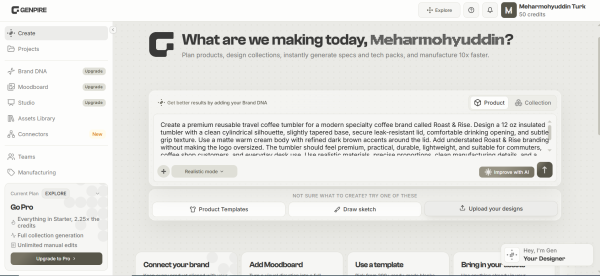
The main dashboard, where you write out your idea in plain sentences and choose between a single product or a full collection before generating anything.
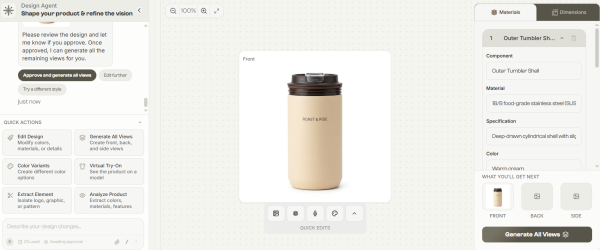
It didn’t take long before a front-view render came back, sitting next to details about the outer shell, material, a written specification, and the color. It read less like an image with a caption underneath and more like a spec entry that happened to come with a picture attached. That was the first small surprise. I’d expected a picture and nothing else, the way most AI image generators work, and instead the panel on the right was already talking about component names and finishes before I’d asked for any of that.
There’s also a chat thread running alongside the render, and it doesn’t just confirm what it made; it asks you to review the design and say whether you approve it before it moves forward. That pause matters more than it sounds like it should. A lot of generation tools just throw output at you and let you deal with it. This one treats the first render as a draft you’re supposed to react to, not a finished answer.
Filling In the Rest of the Views
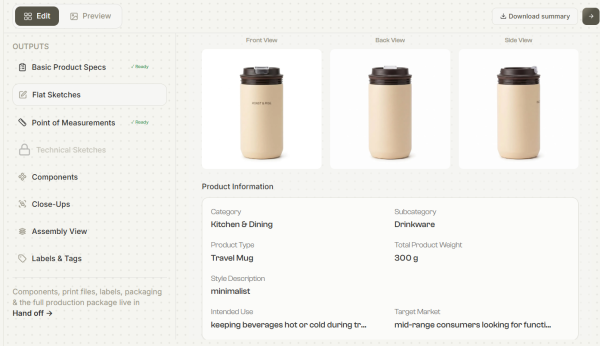
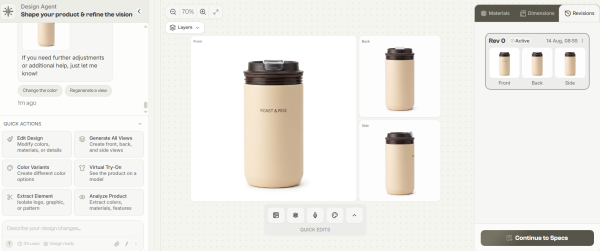
A single angle doesn’t prove much. I asked it to generate the remaining views, and what came back were front, back, side, and held together. Same proportions, same lid, same placement of the brand name on the front. I’ve used other AI image generators where a second angle of the same object quietly turns into a slightly different object. This didn’t do that.
Once a design gets approved, Genpire fills out every angle and files it under a revision, “Rev 0,” and so on, so you’re not losing earlier versions every time you make a change.
There’s a running record of versions in the side panel, which sounds minor until you’re three rounds into edits and need to point out to someone exactly what changed between one version and the next. I went back and compared Rev 0 against what I’d started with, and the lid detail hadn’t drifted at all between angles: same clip mechanism, same rim thickness. Small thing, but it’s the kind of small thing that either makes a document usable by a factory or doesn’t.
I also tried nudging the design after the first pass, asking for a slightly narrower base, and it treated that as an edit to the existing product rather than starting over from scratch. The color, the branding placement, and the general proportions all held steady while just the one dimension shifted. That’s closer to how an actual design revision works than I expected from something built around a text prompt.
What an AI Tech Pack Generator Actually Produces
The renders are the part that photographs well. The actual tech pack is the part that matters if the goal is getting something built, and it’s usually where these tools start cutting corners. Most tech pack software I’d looked at before this either handed you a template you still had to fill in by hand or generated something that looked complete but skipped the details a factory would actually ask about. What I got here included basic product specs, flat sketches, point-of-measurement notes, a components section, category, subcategory, product type, and even a sentence describing intended use rather than a vague dropdown label.
The specs page fills itself out based on what you described in the prompt. I’d treat it as a solid draft, not a final document, worth checking against your own brief before it goes anywhere.
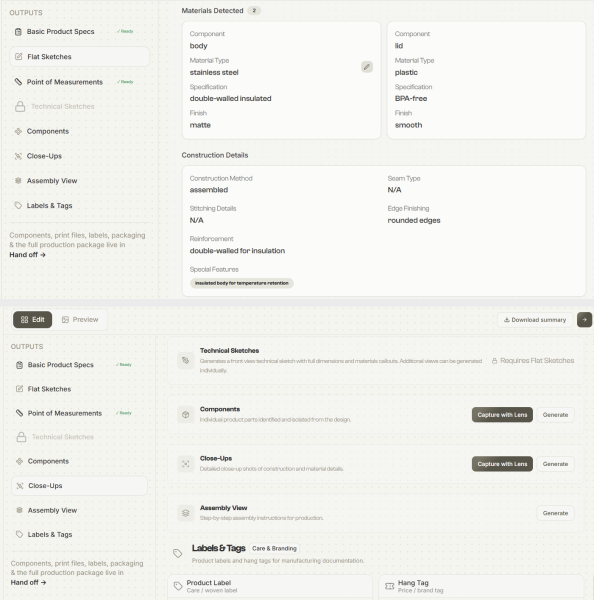
One level further in, the materials breakdown named the body as stainless steel with a matte finish and the lid as BPA-free plastic and then went into construction method, seam type, edge finishing, and a note under special features about the double-walled build being there for temperature retention. Some of it was genuinely close to what I’d expect a manufacturer to want. Some fields, like seam type marked “N/A,” were a reminder that this is working from a written description, not a technical drawing, so it can’t always tell what doesn’t apply to a given product. A tumbler doesn’t have a seam the way a stitched bag or a garment does, and the tool seemed to understand that rather than force an answer where there wasn’t one. This is really the layer where AI product design stops being a picture generator and starts behaving like something closer to a drafting assistant.
What stood out more than any single field was how the whole thing was organized. Materials on one side, construction details on the other, and special features called out separately instead of buried in a paragraph. If I were forwarding this to a sourcing agent, I wouldn’t need to rewrite it into a cleaner format first. That’s not nothing, a lot of what makes early-stage product development slow isn’t the lack of ideas; it’s the gap between having an idea and having a document someone else can act on without a dozen follow-up questions.
Construction and material detail are generated straight from the original prompt; this is the layer that separates a nice render from something closer to a usable spec.
Toward the end, beforehand, there’s a fuller outputs list, flat sketches, technical sketches, close-ups, an assembly view, labels, and tags, some ready immediately, some needing an extra generation step.
The full list of what a completed tech pack can include, with a status marker next to each one showing what’s already generated and what still needs a click.
A couple of the items on that list, technical sketches and assembly view, were locked until I generated the flat sketches first, which makes sense as an order of operations but caught me off guard the first time. It’s worth knowing going in that the outputs aren’t all sitting there waiting for you at once. Some depend on others being finished first, so the process has a sequence to it even if the interface doesn’t spell that out loudly.
The components and close-ups sections offer a capture with a lens option alongside a plain generate button, which, from what I could tell, pulls a more zoomed-in, detail-focused version of a specific part rather than the whole product. I didn’t need it for something as simple as a tumbler, but I can see the value for a product with more moving pieces, a bag with multiple pockets, or a shoe with a layered sole, where a factory would want a close look at one component without the rest of the object cluttering the shot.
Where It Actually Fits
If you already work with a design studio, this probably isn’t a replacement for that relationship; it’s more useful as the step before it, so you’re not walking into that conversation with just a rough idea and a folder of reference photos. Where it earns its place is earlier: someone with a product idea and no manufacturing background who needs something concrete enough to hand to a factory or a sourcing agent without paying for a full design pass just to get there. If you’ve never known how to create a tech pack without hiring someone first, this is closer to that starting point than anything I’ve tried before.
The rough edges were about what I expected from a tool inferring detail from language instead of from an engineer’s drawing, a few fields needed a manual fix, and I wouldn’t send this straight to a factory without someone checking it first. The tumbler is also, admittedly, a fairly forgiving object, round, simple, no fabric behavior or hinge mechanics to account for. I’d want to see how it handles something with more structural complexity before I’d trust it fully on a product where tolerances matter more, like footwear or anything with moving parts. That’s less a criticism of what I saw and more an honest limit of what one test on one object can tell you.
It’s also worth saying plainly what this isn’t. It’s not a replacement for a manufacturer’s own engineering review, and it’s not going to catch every real-world manufacturing constraint a physical prototype would surface. What it does do is compress the distance between “I have an idea” and “I have something concrete enough to start a real conversation with,” and for a lot of people that distance is exactly what’s been stopping them from moving past the idea stage at all.
Time is really the thing I noticed most by the end. Going from a paragraph of description to a set of renders, a materials breakdown, and a specs sheet took me an afternoon, most of which was me reading and adjusting rather than waiting on the tool itself. I don’t have a fair comparison point for how long the same output would take a design studio to put together from scratch, but I’d guess it’s measured in days rather than hours, and that gap alone is probably the strongest argument for trying something like this before committing budget to a full design pass.
If you’ve got a product idea sitting in your notes app and no clear next step, Genpire lets you create a tech pack online before you pay someone to draft one from a blank page. Worst case, you spend an afternoon and learn exactly how far your idea is from a factory-ready tech pack. Best case, you walk away with a document you can actually send.
Disclosure: This review was written as part of a paid collaboration.