Today, information is created faster than ever, making it harder to process and communicate clearly. Professionals, students, and groups are always working with long documents, meeting notes, research papers, and assorted ideas that are hard to digest and even more difficult to convey in a clear manner.
In the past, the text was often not sufficient to convey more complicated relationships, workflows, or strategies.
This is where Diagrimo stands out. Diagrimo is an AI-based application that will convert plain text into clear and well-structured images. Diagrimo enables users to concentrate on ideas and meaning but not on layout and formatting because it eliminates the requirement for manual design skills.
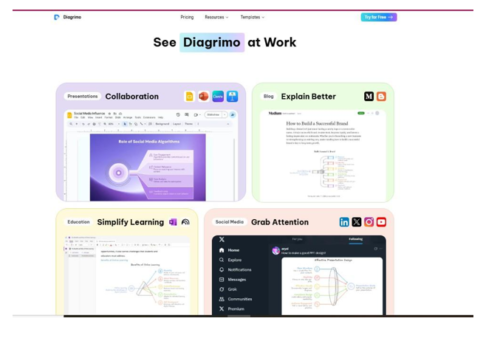
What Is Diagrimo?
Diagrimo is a smart diagram and infographic generator that helps you create visuals easily and efficiently in your daily work. Diagrimo is not a complex tool that is aimed to be used by enterprise users, as opposed to traditional diagram software, where the interface is complicated, and users need to evaluate their skills to use it.
The platform can be used in many different applications, such as education, business planning, content creation, and collaborating with a team. Its essence lies in assisting its users to turn text into visuals to enhance clarity, recall, and communicative ability.
Important Diagrimo (Elucidated) Features.
AI Diagram Generator
Diagrimo is embodied by the AI diagram maker. Diagrimo turns plain text into structured visual representations automatically. This attribute is timesaving and the layout and structure are consistent.
AI Writing Assistant
Diagrimo has an artificial intelligence writing assistant, which enhances the quality of the text to be visualized. One can rewrite content, simplify some complex language, summarize long passages, fix grammar, change tone, or translate text. The input is cleared, and clear visuals are created.
Customization Options
Once a diagram is created, the user is allowed to make changes using colors, fonts, text sizes, strokes, and backgrounds. These choices assist in matching the graphics with branding, appearance styles, or learning requirements.
Collaboration Tools
Diagrimo facilitates work teams: users can invite colleagues to their team using email or embed documents on links. It is easy to collaborate on diagrams, meeting summaries, or project workflows in real time.
Smart Navigation
In longer documents, Diagrimo offers a table of contents that is built-in. The usability and navigation are also enhanced as users can quickly skip to a particular section or diagram.
File Management
Folders, favorites, and fast search tools assist users in organizing their work effectively. It is particularly helpful for dealing with numerous projects or long-term documentation.
Version History and Recovery
Diagrimo keeps track of document changes and allows users to restore previous versions. The recycle bin also provides an opportunity to get back deleted files, which lessens the chances of losing significant work.
Diagrimo Pricing: Is There a Free Plan?
Diagrimo provides a free service that has a generous amount of free credits of 100 credits per day. This is adequate for the vast majority of personal, educational, and small-team applications. Version history is provided to free users for a maximum of seven days.
The Plus plan also offers more features, like an extended version history (up to thirty days) and higher usage limits to satisfy the needs of users who need to extend their usage. This pricing model makes Diagrimo affordable and yet advanced.
A Guide to Diagrimo (Step-by-Step).
- Open Diagrimo and create a new document.
- Press the space key to use the AI Assistant.
- Paste or type your text into the editor.
- Refine, summarize, or restructure the content (where necessary) with the AI Assistant.
- Choose the Visualize option to create a diagram automatically.
- Personalize the visual (color and font) features.
- Share, disseminate, or work on the completed visual.
Real Usage of Diagrimo
Meeting Notes and Brainstorming
With Diagrimo, unstructured meeting notes can be turned into readable visual summaries, which makes it easier to follow up and follow the decision-making process.
Education and Learning
Diagramo can be used by teachers and students to design lesson plans, schedules, concept maps, and SWOT diagrams, which simplify difficult subjects and make them easier to remember.
Project and Content Planning
Workflows and content plans can be visualized to improve alignment across teams.
Pros and Cons of Diagrimo
Pros
- User-friendly, and the learning curve is minimal.
- Fast text-to-visual translation.
- Inbuilt AI enhances the quality of content.
- Generous daily free credits.
- Clean, professional output.
Cons
- Not designed for highly complex enterprise-level diagrams.
- Advanced users may find customization options limited.
Diagrimo vs Traditional Diagram Tools: Why Choose Diagrimo?
The old-fashioned diagram tools can be manual, such as dragging shapes and changing layouts. Diagrimo is text-first, and AI is used to automate the visualization. This ensures it is a preferred option among users who prioritize speed, clarity, and portability over sophisticated manual controls.
Conclusion
Diagrimo demonstrates that the process of making diagrams and infographics does not require complex or time-consuming tasks. It allows one to convey ideas clearly and professionally by combining AI-based writing support with immediate text-to-image translation.
Diagrimo can be a useful and efficient way of transforming text into meaningful visuals with customization options, collaboration features, and reliable version recovery, as well as a powerful free plan. Diagrimo is a practical tool for anyone looking to simplify complex information and communicate ideas more clearly without design skills.